Filling In the Output Attributes Tab
The Output tab contains the selection of output Attributes for the elements in the model. These Attributes hold the values for the reconciled measurement and tolerance, as well as statistical results, such as Solvability and Imbalance. The selected values and tolerances are the outputs from the Sigmafine Reconciliation engine and the Composition Tracking solver.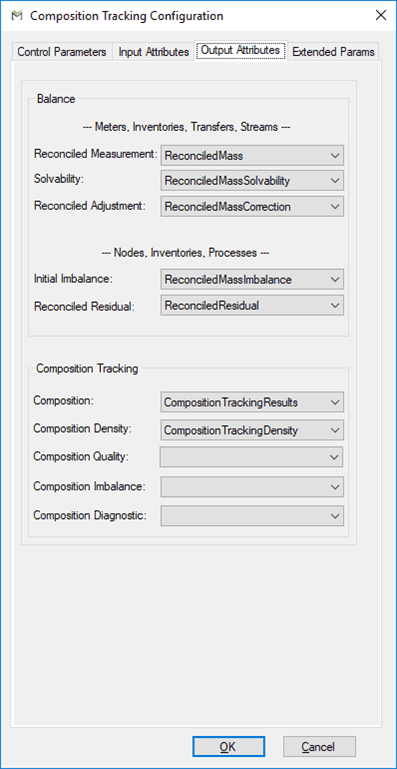
The following tables define the parameters configured on the Output Attributes tab.
Note: The input values you use for the parameters listed in the following table must be valid ones specified in the Element templates.
Output Attributes Tab – Meters, Inventories, Transfers, Streams
| Parameter | Description |
|---|---|
| Reconciled Measurement 1 | Element Attribute for reconciled value. |
| Solvability 1 | Element Attribute for solvability. |
| Reconciled Adjustment 1 | Element Attribute for reconciled correction to measurement. |
| 1 Selection of these Attributes is available only when you select Rule 1 or Rule 2. See Balancing Rules. |
Output Attributes Tab – Nodes, Inventories, Processes
| Parameter | Description |
|---|---|
| Initial Imbalance 1 | Initial imbalance Attribute of the balance point. |
| Reconciled Residual 1 | Reconciled residual Attribute of the balance point. |
| 1 Selection of these Attributes is available only when you select Rule 1 or Rule 2. See Balancing Rules. |
Output Attributes Tab –Composition Tracking
| Parameter | Description |
|---|---|
| Composition | Data Table Attribute for the results of the composition tracking. |
| Composition Density | Density Attribute in which to store the density calculated from the composition tracking results. |
| Composition Quality | Quality Attribute in which to store the quality calculated from the composition tracking results. |
| Composition Imbalance | Composition imbalance Attribute in which to store the calculated component imbalance. |
| Composition Diagnostic | Composition diagnostic Attribute in which to store the diagnostic index. |
| 1 The configuration of this Attribute is optional. |
When you have filled out the three tabs, click OKto close the Composition Tracking Configuration window and return to the Model Analysis Properties window.